HTML <dir> tag was used as a container for the list of files/folders or content of the directory. The <dir> element is used with the <li> tags, and list of directories renders in bullets by default.
Syntax:
<dir>Directory list... </dir> Following are some specifications about the HTML <dir> tag
| Display | Block |
| Start tag/End tag | Both Start and End tag |
| Usage | HTML lists |
Example 1:
<!DOCTYPE html>
<html>
<head>
    <title>Dir tag</title>
    <style>
        h2{
            color: #b22222;}
        p{
           color: green;}
    </style>
 </head>
<body>
  <h2>Example of dir tag</h2>
  <p>List of javaTpoint popular Tutorials</p>
    <dir>
    <li>Java-tutorial</li>
    <li>DBMS-tutorial</li>
    <li>DataStructure-tutorial</li>
    <li>HTML-tutorial</li>
   </dir>
 </body>
</html>
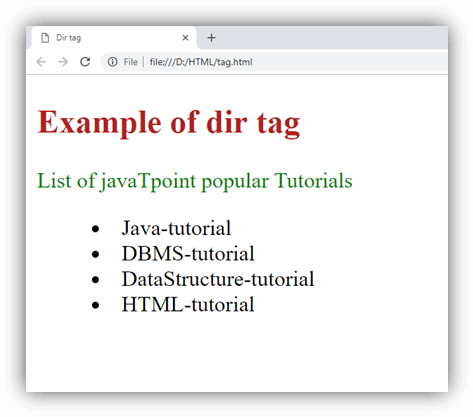
Output:
Attribute
Tag-specific Attribute
| Attribute | Value | Description |
|---|---|---|
| compact | compact | It specifies that list should display smaller than normal. (Not supported in HTML5) |
Global Attribute
HTML <dir> tag supports the Global attributes.
Event Attribute
HTML <dir> tag supports the Event attributes.
Supporting Browsers
| Element |  Chrome Chrome |  IE IE |  Firefox Firefox |  Opera Opera |  Safari Safari |
| <dir> | Yes | Yes | Yes | Yes | Yes |