HTML <td> tag is used to specify the cells of an HTML table which contain data of the table. The <td> tag must be the child element of <tr> (table row) tag. Each table row can contain multiple <td> data elements.
The grouped <td> elements of a <tr> tag renders as a single row in the table. The content of the <td> elements is regular and left-aligned in the table by default.
Syntax:
<td>.......</td> | Display | Inline |
| Start tag/End tag | Start and End tag |
| Usage | Table content |
Example
<!DOCTYPE html>
<html>
<head>
    <title>HTML td tag</title>
    <style>
    th{
     background-color: #6495ed;
    }
    th,td{
        border: 1px solid black;
        padding: 10px;
        }
    </style>
</head>
<body>
  <h2>Example of td Tag</h2>
  <table style=" border-collapse: collapse; background-color:#dcdcdc;">
       <tr>
    <th>Product</th>
    <th>Quantity</th>
    <th>Price</th>
       </tr>

    <tr>
        <td>Books</td>
        <td>5</td>
         <td>589</td>
    </tr>

    <tr>
       <td>T-shirt</td>
       <td>5</td>
       <td>3500</td>
    </tr>

            <tr>
      <td>Jeans</td>
        <td>2</td>
       <td>5000</td>
    </tr>
  </table>
</body>
</html>
Output:
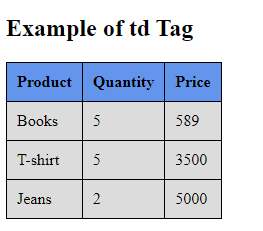
Fixed column width using <td> tag in a table
In an HTML table, the dimensions of the rows and columns in a table are automatically adjusted by the browser so that the contents fit in the row. However, there can be a situation where the width of the columns needs to be fixed or equal-sized. So there are various techniques to fix the width of the column.
<td> tag width attribute: The <td> tag width attribute is used to fix the width of a particular column. With this, we can assign a numeric value to this attribute or in terms of percentage.
Following is an example of fixing the column width using the <td> tag width attribute.
Example 1
<! DOCTYPE html>
<html>
<head>
    <title> HTML td tag with fixed width </title>
  <meta charset = "UTF-8" />
  <meta name = "viewport" content = "width=device-width,
   initial-scale = 1.0" />
    <style>
@import url(https://fonts.googleapis.com/css?family=Bangers);
    body {
  text-transform: uppercase;
  text-align: center;
  white-space: nowrap;
  color: #fff;
  background-color: #E1332D;
}
    table.center {
  margin-left: auto;
  margin-right: auto;
}
    th {
     background-color: #6495ed;
    }
    th,td {
        border: 1px solid red;
        padding: 10px;
        }
thead {
  display: table-header-group;
color: green;
font-weight: bold;
}
h2 {
  text-align: center;
  font-weight: normal;
  color: #fff;
  text-transform: uppercase;
  font-size: 1em;
  white-space: nowrap;
  font-size: 4vw;
  z-index: 1000;
  font-family: 'Bangers', cursive;
  text-shadow: 5px 5px 0 rgba(0, 0, 0, 0.7);
  @include skew(0, -6.7deg, false);
  @include transition-property(font-size);
  @include transition-duration(0.5s);

}
thead {
      border-top: 1px solid #ccc;
      padding:10px;
      width: 120px;
        background-color: #004496;
        color: #fff;
        font-family: arial;
        font-size: 12px;

    }
    td {
      border-top: 1px solid #ccc;
      padding:10px;
      width: 120px;
        background-color: #004496;
        color: #fff;
        font-family: arial;
        font-size: 12px;

    }
    th {
      border-top: 1px solid #ccc;
      padding:10px;
      width: 120px;
        background-color: #004496;
        color: #fff;
        font-family: arial;
        font-size: 12px;

    }
    h3 {
  text-align: center;
  font-weight: normal;
  color: #fff;
  text-transform: uppercase;
  font-size: 1em;
  white-space: nowrap;
  font-size: 3vw;
  z-index: 1000;
  font-family: 'Bangers', cursive;
  text-shadow: 5px 5px 0 rgba(0, 0, 0, 0.7);
  @include skew(0, -6.7deg, false);
  @include transition-property(font-size);
  @include transition-duration(0.5s);

}
    </style>
</head>
<body>
  <h2> Example </h2>
  <h3> Fixed column width using td Tag </h3>
  <table class = "center" style = " border-collapse: collapse; background-color:#dcdcdc;">
<thead>
      <tr>
        <td width  = "10%" style = "color:red;"> Sr. No </td>
        <td width = "40%"> Product </td>
        <td width = "20%"> Quantity </td>
        <td width = "30%"> Price </td>
      </tr>
    </thead>

    <tr>
        <td style = "color:red;"> 1 </td>
        <td> Books </td>
        <td> 5 </td>
         <td> 589 </td>
    </tr>

    <tr>
       <td style = "color:red;"> 2 </td>
       <td> T-shirt </td>
       <td> 5 </td>
       <td> 3500 </td>
    </tr>
            <tr>
       <td style = "color:red;"> 3 </td>
      <td> Jeans </td>
        <td> 2 </td>
       <td> 5000 </td>
    </tr>
<tr>
       <td style = "color:red;"> 4 </td>
      <td> Suits </td>
        <td> 3 </td>
       <td> 6000 </td>
    </tr>

  </table>
</body>
</html>
Explanation:
In the above example, we have created an example of fixing the column width using the <td> tag width attribute.
Output:
Following is the output of this example.
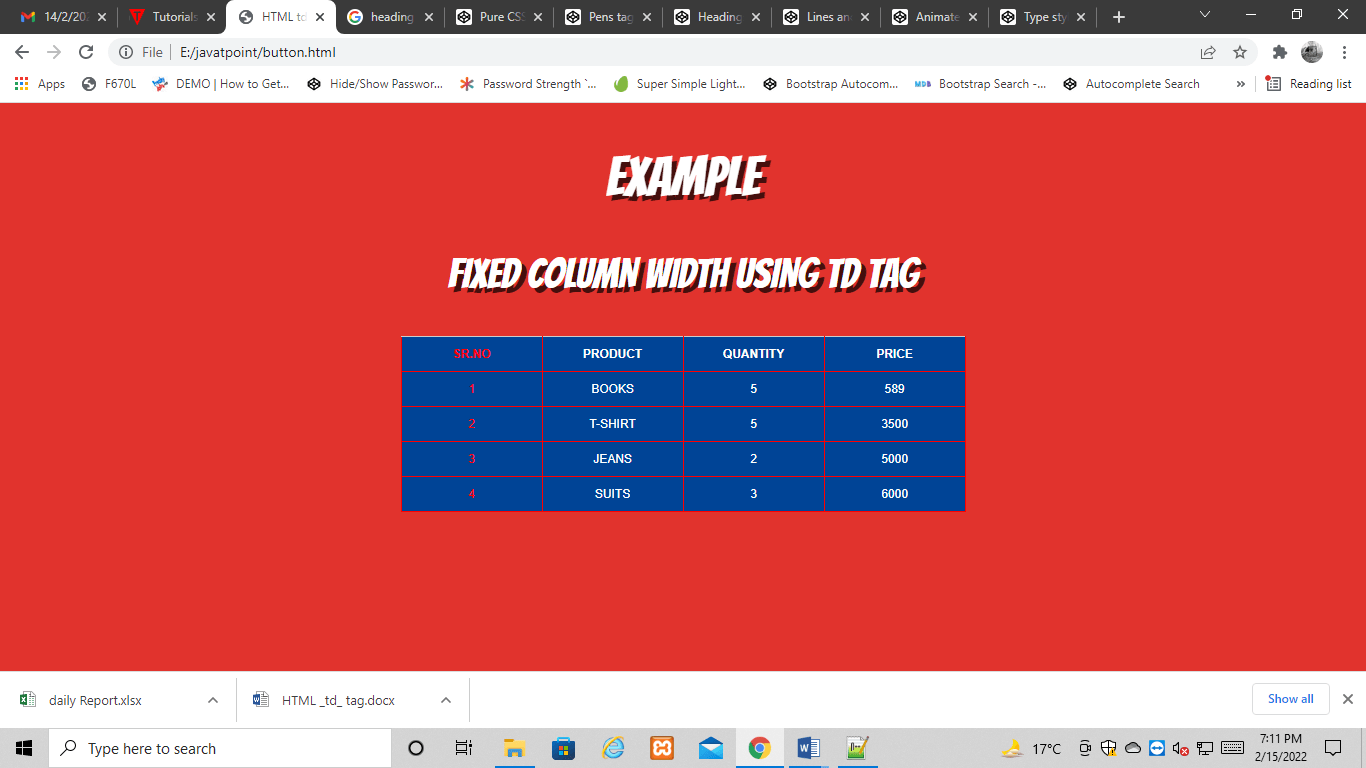
Example 2:
<! DOCTYPE html>
<html>
<head>
    <title> HTML td tag with  Equal width  column </title>
  <meta charset = "UTF-8" />
  <meta name = "viewport" content = "width=device-width,
   initial-scale = 1.0" />
    <style>
body {
  font-family: "Open Sans", sans-serif;
  line-height: 1.25;
}
table {
  border: 1px solid #ccc;
  border-collapse: collapse;
  table-layout: fixed;
  width: 100%;
}
table caption {
  font-size: 1.5em;
  margin: .5em 0 .75em;
}
table tr {
  border: 1px solid #ddd;
  padding: .35em;
}
table tr:nth-child(even) {
  background: #f8f8f8;
}
table th {
  padding: .625em;
  text-align: left;
}
table td {
  padding: .625em;
  text-align: left;
}
table th {
  background: #999;
  color: #fff;
  font-size: 1.85em;
  letter-spacing: .1em;
  text-transform: uppercase;
}
table td {
  white-space: nowrap;
  overflow: hidden;
  text-overflow: ellipsis;
}
@import url(https://fonts.googleapis.com/css?family=Bangers);
    body {
  text-transform: uppercase;
  text-align: center;
  white-space: nowrap;
  color: #fff;
  background-color: #E1332D;
}
h2 {
  text-align: center;
  font-weight: normal;
  color: #fff;
  text-transform: uppercase;
  font-size: 1em;
  white-space: nowrap;
  font-size: 3vw;
  z-index: 1000;
  font-family: 'Bangers', cursive;
  text-shadow: 5px 5px 0 rgba(0, 0, 0, 0.7);
  @include skew(0, -6.7deg, false);
  @include transition-property(font-size);
  @include transition-duration(0.5s);

}
thead {
      border-top: 1px solid #ccc;
      padding:10px;
      width: 120px;
        background-color: #004496;
        color: #fff;
        font-family: arial;
        font-size: 12px;

    }
    td {
      border-top: 1px solid #ccc;
      padding:10px;
      width: 120px;
        background-color: #004496;
        color: #fff;
        font-family: arial;
        font-size: 12px;

    }
    th {
      border-top: 1px solid #ccc;
      padding:10px;
      width: 120px;
        background-color: #004496;
        color: #fff;
        font-family: arial;
        font-size: 18px;

    }
    h3 {
  text-align: center;
  font-weight: normal;
  color: #fff;
  text-transform: uppercase;
  font-size: 1em;
  white-space: nowrap;
  font-size: 2vw;
  z-index: 1000;
  font-family: 'Bangers', cursive;
  text-shadow: 5px 5px 0 rgba(0, 0, 0, 0.7);
  @include skew(0, -6.7deg, false);
  @include transition-property(font-size);
  @include transition-duration(0.5s);

}
    </style>
</head>
<body>
  <h2> Example </h2>
  <h3> Equal Sized column width using td Tag </h3>
<table>
  <thead>
    <tr>
      <th scope = "col"> Sr. No </th>
      <th scope = "col"> Product </th>
      <th scope = "col"> Quantity </th>
      <th scope = "col"> Price </th>
    </tr>
  </thead>
  <tbody>
        <tr>
        <td style = "color:red;"> 1 </td>
        <td> Books </td>
        <td> 5 </td>
         <td> 589 </td>
    </tr>

    <tr>
       <td style = "color:red;"> 2 </td>
       <td> T-shirt </td>
       <td> 5 </td>
       <td> 3500 </td>
    </tr>
            <tr>
       <td style = "color:red;"> 3 </td>
      <td> Jeans </td>
        <td> 2 </td>
       <td> 5000 </td>
    </tr>
<tr>
       <td style = "color:red;"> 4 </td>
      <td> Suits </td>
        <td> 3 </td>
       <td> 6000 </td>
    </tr>
  </tbody>
</table>
</body>
</html>
Explanation:
In the above example, we have created an example of equal size column width using <td> tag.
Output:
Following is the output of this example.
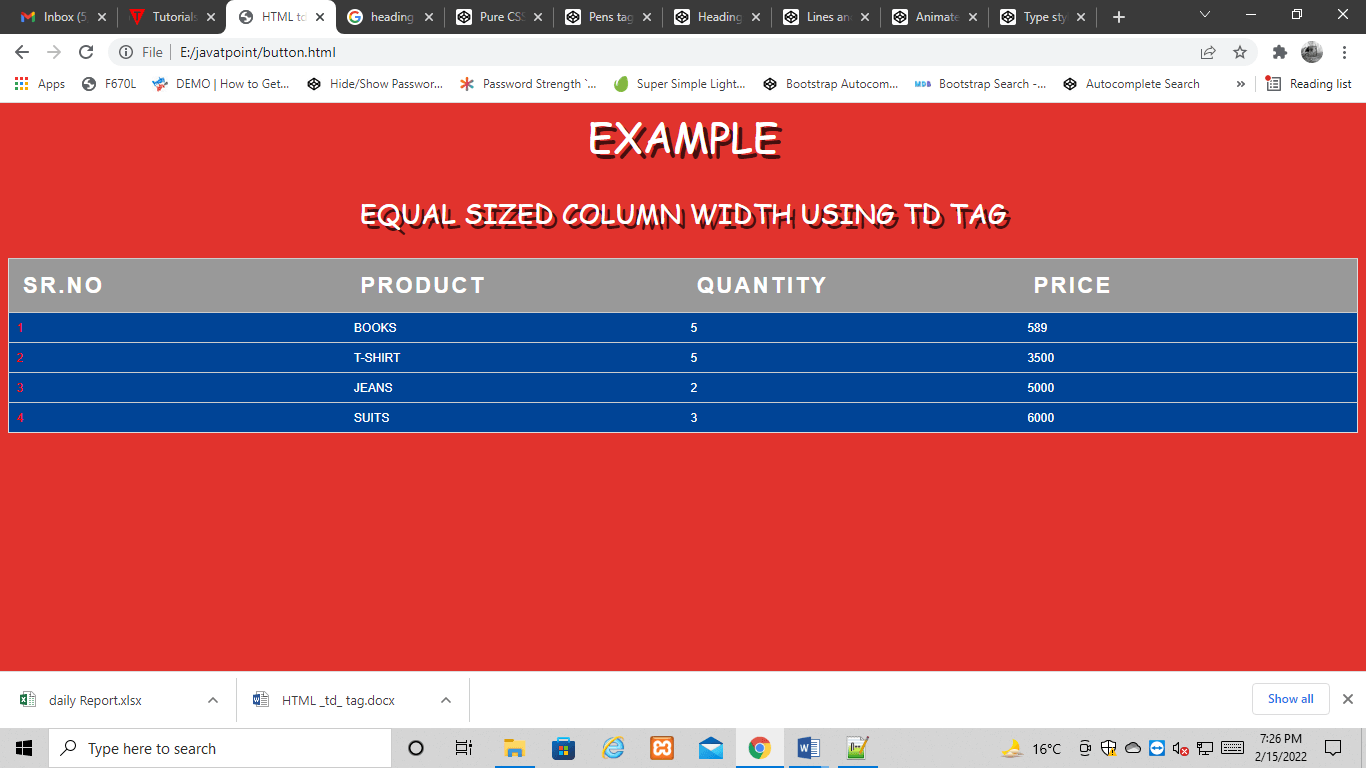
Fixed column width using <col> tag in a table
<col> tag: The <col> tag in a table is used to fix the width of a particular column. With this, we can assign a numeric value to this attribute or in terms of percentage.
Following is an example of how to fix the column width using the <col> tag.
Example 1:
<! DOCTYPE html>
<html>
    <head>
        <title> Html fixed width using col tag </title>
        <meta charset = "UTF-8" />
        <meta name = "viewport"
            content = "width=device-width,
                    initial-scale = 1.0" />
        <style>
        @import url(https://fonts.googleapis.com/css?family=Bangers);
    body {
  text-transform: uppercase;
  text-align: center;
  white-space: nowrap;
  color: #fff;
  background-color: #E1332D;
}
table {
    border: 1px solid black;
    border-collapse: collapse;
    margin-left: auto;
  margin-right: auto;
}
th {
    border: 1px solid black;
    border-collapse: collapse;
    margin-left: auto;
  margin-right: auto;
}
td {
    border: 1px solid black;
    border-collapse: collapse;
    margin-left: auto;
  margin-right: auto;
}

    table {
      width: 50%;
    }
    table.fixed {
        table-layout: fixed;
    }
    table.fixed td {
        overflow: hidden;
    }
    thead {
  display: table-header-group;
color: green;
font-weight: bold;
}
h2 {
  text-align: center;
  font-weight: normal;
  color: #fff;
  text-transform: uppercase;
  font-size: 1em;
  white-space: nowrap;
  font-size: 4vw;
  z-index: 1000;
  font-family: 'Bangers', cursive;
  text-shadow: 5px 5px 0 rgba(0, 0, 0, 0.7);
  @include skew(0, -6.7deg, false);
  @include transition-property(font-size);
  @include transition-duration(0.5s);

}
thead {
      border-top: 1px solid #ccc;
      padding:10px;
      width: 120px;
        background-color: #004496;
        color: #fff;
        font-family: arial;
        font-size: 12px;

    }
    td {
      border-top: 1px solid #ccc;
      padding:10px;
      width: 120px;
        background-color: #004496;
        color: #fff;
        font-family: arial;
        font-size: 12px;

    }
    th {
      border-top: 1px solid #ccc;
      padding:10px;
      width: 120px;
        background-color: #004496;
        color: #fff;
        font-family: arial;
        font-size: 12px;

    }
    h3 {
  text-align: center;
  font-weight: normal;
  color: #fff;
  text-transform: uppercase;
  font-size: 1em;
  white-space: nowrap;
  font-size: 3vw;
  z-index: 1000;
  font-family: 'Bangers', cursive;
  text-shadow: 5px 5px 0 rgba(0, 0, 0, 0.7);
  @include skew(0, -6.7deg, false);
  @include transition-property(font-size);
  @include transition-duration(0.5s);

}
        </style>
    </head>
    <body>
        <h2> Example </h2>
  <h3> Fixed column width using col Tag </h3>
                <div style = "overflow-x: auto;">
            <table>
            <col style = "width: 10%;" />
<col style = "width: 40%;" />
<col style = "width: 20%;" />
<col style = "width: 30%;" />
<tr>
    <th> Sr. No </th>
    <th> Product </th>
   <th> Quantity </th>
      <th> Price </th>
</tr>
<tr>
        <td style = "color:red;"> 1 </td>
        <td> Books </td>
        <td> 5 </td>
         <td> 589 </td>
    </tr>
    <tr>
       <td style = "color:red;"> 2 </td>
       <td> T-shirt </td>
       <td> 5 </td>

       <td> 3500 </td>
    </tr>
     <tr>
       <td style = "color:red;"> 3 </td>
      <td> Jeans </td>
        <td> 2 </td>
       <td> 5000 </td>
    </tr>
<tr>
       <td style = "color:red;"> 4 </td>
      <td> Suits </td>
        <td> 3 </td>
       <td> 6000 </td>
    </tr>
</table>
        </div>
    </body>
</html>
Explanation:
In the above example, we have created an example of fixing the column width using the <col> tag.
Output:
Following is the output of this example.
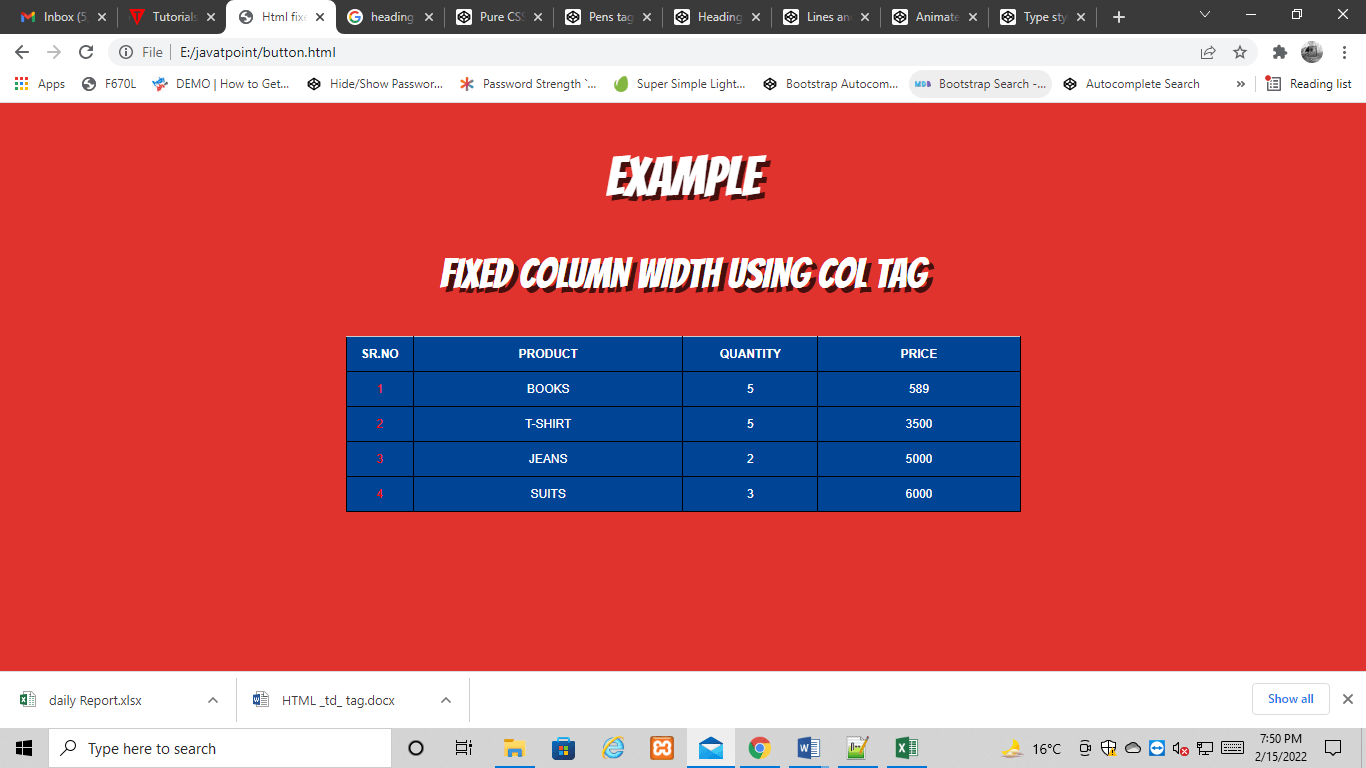
Attribute:
Tag-specific attributes:
| Attribute | Value | Description |
|---|---|---|
| abbr | text | It defines the abbreviated version of content of the cell. (Not Supported in HTML5) |
| align | left right center justify char | It specifies the alignment of the content of the cell. (Not Supported in HTML5) |
| axis | category_name | It Categorizes Cells. . (Not Supported in HTML5) |
| bgcolor | rgb(x,x,x) #xxxxxx Color_name | It sets the background color of the cell. (Not Supported in HTML5) |
| char | character | It specifies the alignment of the content of cell to the character. (Not Supported in HTML5) |
| charoff | number | It determines the number of characters the content aligned from the character specified by the char attribute. (Not Supported in HTML5) |
| colspan | number | It determines the number of columns a cell should span. |
| headers | header_id | It determines one or more header cells to which a cell is related. |
| height | % pixels | It determines the height of a table cell. (Not Supported in HTML5) |
| nowrap | nowrap | If it sets then content inside the cell should not wrap. (Not Supported in HTML5) |
| rowspan | number | It determines the number of rows a cell should span. |
| scope | col colgroup row rowgroup | It specifies the cells that the header element relates to. (Not Supported in HTML5) |
| valign | top middle bottom baseline | It determines the vertical alignment of the cell content. (Not Supported in HTML5) |
| width | % pixels | It determines the width of the cell.(Not Supported in HTML5) |
Global attribute:
The <td> tag supports the Global attributes in HTML.
Event attribute:
The <td> tag supports the Event attributes in HTML.