HTML <track> tag is used to define time-based text tracks for a media file. The <track> tag must use as child element of <audio> and <video> elements.
The <track> tag is used to add subtitle, caption, or any other form of text which displayed when a media file plays.
HTML <track> is new tag in HTML5.
Syntax
<track src=" " kind=" " srclang=" " label=" "> Following are some specifications about the HTML <track> tag
| Display | None |
| Start tag/End tag | Only start tag(End tag forbidden) |
| Usage | HTML media |
Example
 <!DOCTYPE html>
<html>
<head>
<title>HTML track Tag</title>
</head>
<body>
 <h2>Example of track tag</h2>
 <video controls="controls">
     <source src="flower.mp4" type="video/mp4">
    <track src="flower.vtt" kind="subtitles" srclang="en" label="English">
    Sorry!Your browser does not support the track
 </video>
</body>
</html>
In the above example, we have used flower.vtt file to add subtitle in the video file. Following is the flower.vtt file:
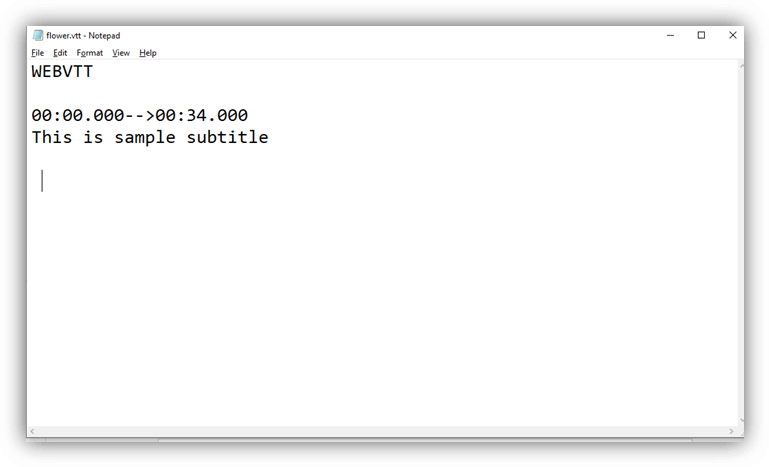
How to create WEBVTT file:
Following are some basic steps to create WEBVTT file for <track> tag:
- Open text editor in your PC such as Notepad
- Write WEBVTT as the first line in the editor
- Leave a blank line
- Specify the time duration in the proper format (you can also provide numbering and add CSS).
- Enter and write your text which you want to add a subtitle or caption, and repeat step 3 to 5 until you finish it.
- Save it using .vtt extension.
Now your WEBVTT file is ready to use.
Attribute:
Tag-specific attributes:
| Attribute | Value | Description |
|---|---|---|
| default | default | It specifies that the track should be enabled unless the user?s preferences indicate that another track is more important. |
| kind | captions chapters descriptions metadata subtitles | It specifies that which type of text track you want to add. |
| label | text | It specifies the title of the text track. |
| src | URL | It defines the URL of the track file. |
| srclang | language_code | It defines the language of the track text content, such as English, Germany, etc. |
Global attribute:
The <track> tag supports the Global attributes in HTML.
Event attribute:
The <track> tag supports the Event attributes in HTML.