The ul is a tag in Html. Html <ul> tag is used for designing the unordered list of items. The <ul> tag is a pair tag, so it is mandatory to close this tag. For defining the items in the list, we have to use <li> tag in the <ul> tag. If we want to create the ordered list of items in the Html document, then we have to use the <ol> tag.
This tag also uses the attribute type, which sets the bullet style for the list items. We can specify following values in the type attribute:
- Disc
- Circle
- Square
We can easily understand the <ul> tag by the examples. So, we will provide the following various examples.
Example 1: This example uses the type attribute with different values.
<!Doctype Html>
<Html>
<Head>
<Title>
Ul tag with Type attribute
</Title>
</Head>
<Body>
Hello User!.... <br>
The following list uses the Square mark in front of list items.
<ul type="square">
<li> Cars </li>
<li> bikes </li>
<li> Aeroplanes </li>
<li> Trains </li>
<li> Ships </li>
</ul>
The following list uses the Circle mark in front of list items.
<ul type="Circle">
<li> BMW </li>
<li> Audi </li>
<li> Mercedes </li>
<li> Jaguar </li>
<li> Lamborghini </li>
</ul>
The following list uses the Disc mark in front of list items.
<ul type="disc">
<li> Apache </li>
<li> KTM </li>
<li> R15 </li>
<li> Ducati </li>
<li> Harley-Davidson </li>
</ul>
</Body>
</Html>
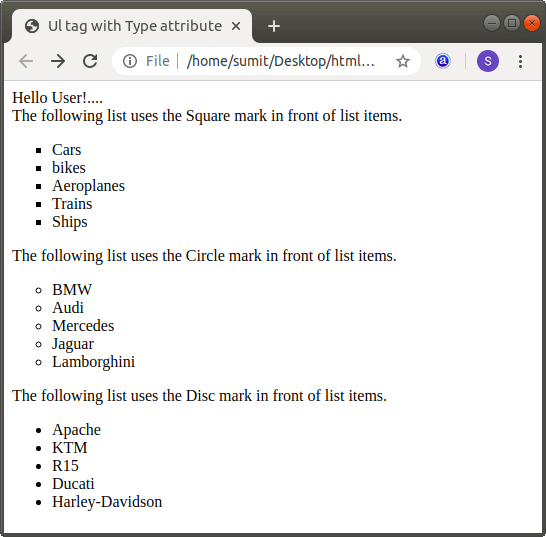
The output of example 1 is shown in the following screenshot:
Example 2: This example describes how to create the nested unordered list in Html:
<!Doctype Html>
<Html>
<Head>
<Title>
Nested Unordered list
</Title>
</Head>
<Body>
Hello User!.... <br>
The following list uses the Square mark in front of list items.
<ul type="square">
<li> Cars: </li>
<ul type="Circle">
<li> BMW </li>
<ul type="square">
<li> BMW X5 </li>
<li> BMW X7 </li>
<li> BMW Z4 </li>
<li> BMW M2 </li>
</ul>
<li> Audi </li>
<ul type="square">
<li> Audi Q8 </li>
<li> Audi Q7 2020 </li>
<li> Audi Q3 </li>
<li> Audi A7 </li>
</ul>
<li> Mercedes </li>
<li> Jaguar </li>
<ul type="square">
<li> Jaguar XF </li>
<li> Jaguar XE </li>
<li> Jaguar E Pace </li>
<li> Jaguar I Pace </li>
</ul>
<li> Lamborghini </li>
</ul>
<li> bikes: </li>
<ul type="disc">
<li> Apache </li>
<li> KTM </li>
<li> R15 </li>
<li> Ducati </li>
<li> Harley-Davidson </li>
</ul>
<li> Aeroplanes </li>
<ul type="circle">
<li> Air India </li>
<li> Indigo</li>
<li> Vistara </li>
<li> GoAir </li>
<li> SpiceJet </li>
</ul>
<li> Trains </li>
<li> Ships </li>
</ul>
</Body>
</Html>
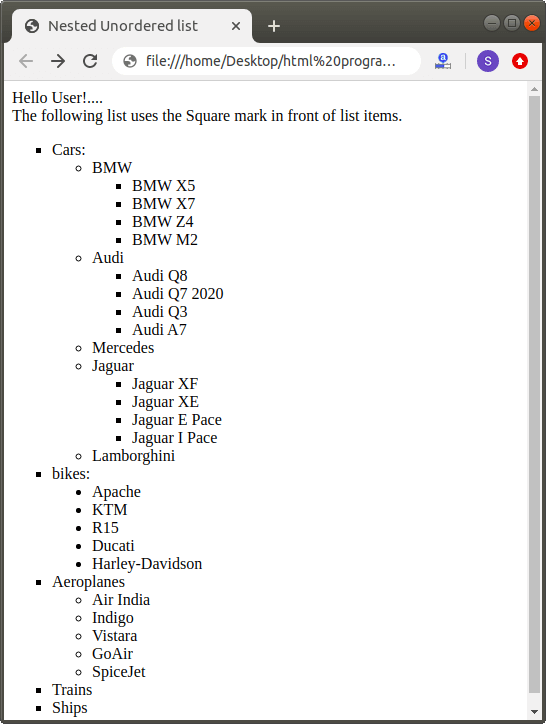
The output of example 2 is shown in the following screenshot: